
Can I sell my very old laptop?
Can I Sell My Very Old Laptop?
Do you have an old laptop because you don't know what to do with it? Are you wondering how to sell old laptops? Well, some devices still work well for simple tasks, even if they're not in perfect condition. Broken laptops may still have value for parts, and working ones can be sold or traded in. This means much more than just listing it online.
Selling your old laptop is not only about finding a buyer. You must protect your personal data, understand the device’s condition, and choose the right selling laptop method. So, in this blog we help you receive a fair price. Ready? Let’s get started!

How to Sell My Old Laptop?
The table below shows the most suitable selling option based on the condition of your old laptop.
The Process of Selling Old Laptops
To sell you used laptops, you should take the following steps:
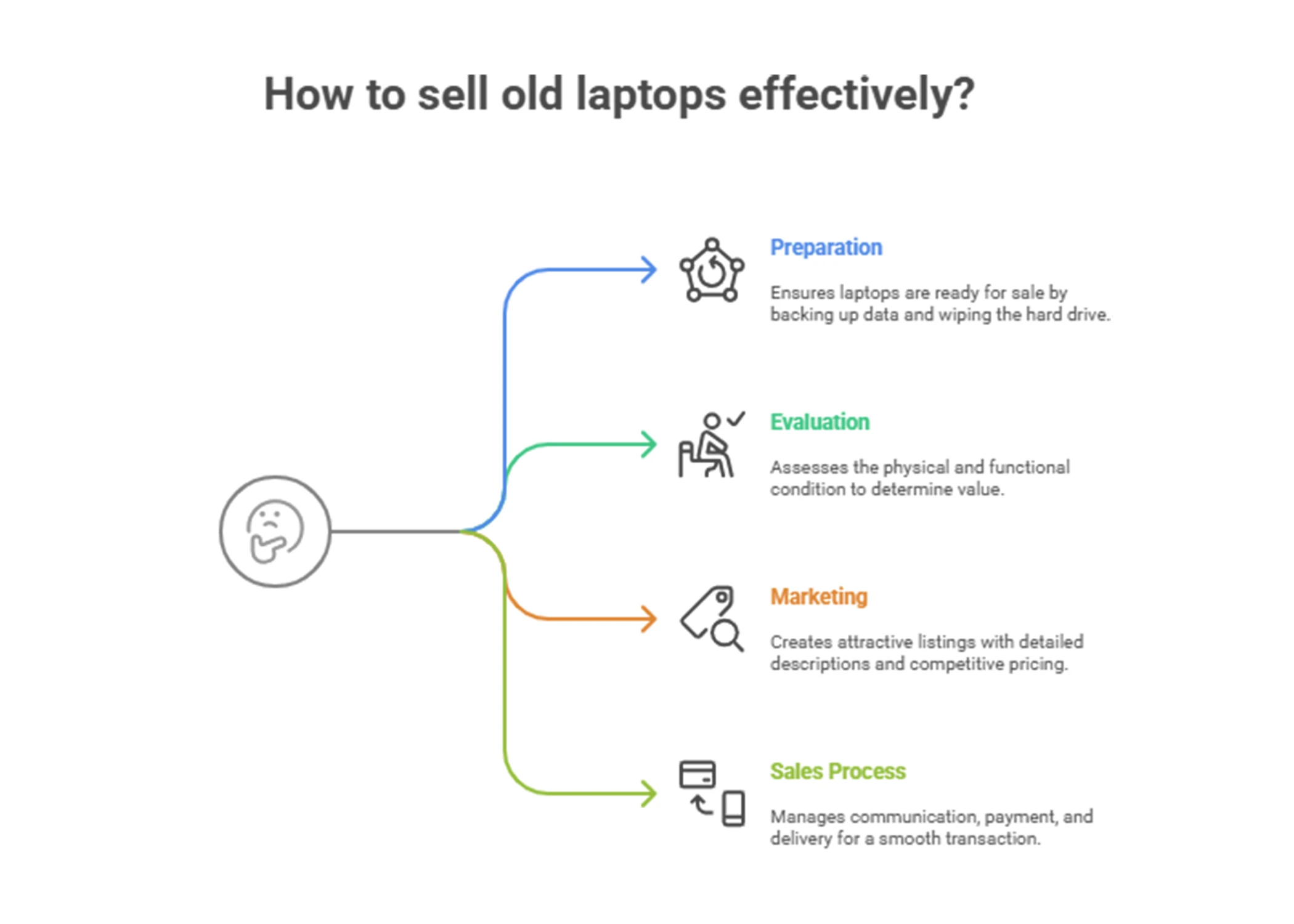
◾ Assess the Condition
1. Evaluate the Physical Condition
First, take a good look at the physical condition of your laptop. Check for any cracks, dents or missing keys—anything that may be giving your laptop a better appearance. Therefore, a well-kept appearance will make it easier to sell old laptops to interested buyers.
2. Check the Functional Status
Turn on the laptop and make sure it is working properly. Note all software, display and battery issues. Most buyers will prefer to buy an old working laptop rather than one that will not turn on at all.
3. Determine the Specifications
Provide your laptop's specifications, such as processor type, RAM size, storage capacity and special features. This is relevant information to set a realistic price when planning to sell used laptops, and to let interested buyers know some key details.
our services: IT Asset BuyBack
◾ Get Your Laptop Ready for Resale
1. Backup Your Data
Before selling your used laptop, back up all your important data. You can do this with an external hard drive, cloud storage, or another device, or simply save the files, photos, and other important information.
.webp)
2. Wipe Hard Drive
It's also important to wipe your data from the hard drive so it never falls into other hands. Run a reputable data destruction method or software to make sure none of your data is recoverable by the new owner.
3. Restore to Factory Settings
Restore the laptop to its factory settings. All your data and software will be erased, leaving the laptop in as pure a condition as when it was new. This also deters the buyers who want a clean slate.
our services: Data Destruction Services
◾ Determine the Value
1. Research Market Prices
Check online auction sites, like eBay and Craigslist or websites concerned specifically with electronics resales to find a comparable selling price of laptops. This will provide you with an estimated value of your laptop.
2. Consider Depreciation
Always keep in mind that all your electronics depreciate over time. The older the laptop the smaller it will fetch from customers. Classic models or laptops with unique specifications can still mount a good value, though.
_result.webp)
◾ Selling Options
1. Online Marketplaces
Websites, on par with giants like eBay, Amazon and Craigslist, make selling used laptops straightforward and efficient. They let you reach many people and establish your price. But be prepared for the hassle of shipping and possible returns.
Other articles: Do laptops have resale value?
2. Trade-In Programs
Many electronics retailers and manufacturers have trade-in programs in place that make it quite easy to turn your old laptop in for a store credit or cash. While the offer won't be too high, this way is hassle-free.
3. Specialty Electronics Resellers
Some companies specialize in buying and refurbishing old devices. They know how to sell old laptops at scale. In many cases they offer an easy, painless process to sell your laptop. Though the offer will be lower compared to direct sales to a consumer, it's reliable and fast.
◾ Improving the Sale
1. Take Nice Pictures
If you include high-quality photos it can make a huge difference and attract more buyers. Take clear and well-lit photos from multiple angles of the laptop, including close-ups of the damage and the specifications sticker.
Other articles: How to securely recycle enterprise computers
2. Write a Detailed Description
Describe the condition and specifications in detail of the laptop being sold along with any accessories included. Be honest about damages if any to avoid disputes later on.
3. Set a Competitive Price
Price your laptop competitively based on your research. A fair price will attract more buyers and help you sell used laptops more quickly.
◾ Final Steps
1. Engaging Communication with Potential Buyers
Respond promptly to any pending queries and add any other information that the prospective buyers may need. Good communication can build trust that will make the transaction processes run smoother.
2. Secure payment
Choose a secure method of payment. When you sell old laptops online, consider PayPal and other major vendors for a safe and straightforward transaction.
Other articles: laptop buy back policy
3. Shipping and Delivery
Arrange shipping properly for your old laptop if it is sold online to avoid damages when it reaches the buyer. Ship with proper and reliable shipping service and provide tracking information to the selling personnel. Such a safe meeting place should be chosen for a local deal in a public place.
Can I Sell My Very Old Laptop?
The answer is YES! Even if your laptop is very old, it could still have resale potential. While the value may not be as high as newer models, older laptops can still be attractive to individuals or organizations that need cost-effective solutions for basic tasks like word processing, browsing, or media consumption.
To get the best price for your old laptop, make sure it’s in working condition, even if it’s no longer suitable for high-performance tasks. Many buyers are willing to pay for refurbished models, and some can even upgrade the internal hardware to extend the laptop’s life.
Before selling, it's crucial to securely erase all personal data from the device to prevent data breaches. Working with a trusted IT asset disposition (ITAD) provider, such as Rapid Solutions International, ensures that your data is safely wiped and the laptop is either recycled or resold in an eco-friendly manner.
By selling your old laptop, you’re not just earning a bit of extra cash; you’re contributing to the circular economy by giving the device a second life and reducing electronic waste.
How Rapid Solutions Buys Your Old Laptops (For Organizations)?
If your company, school, or agency has outdated or unused laptops, Rapid Solutions makes it easy to sell them securely, responsibly, and profitably. We specialize in buying old laptops in bulk from organizations and managing the entire process with full transparency and data protection.
Rapid Solutions is NIST 800-88 and ADISA certified, ensuring secure data destruction and eco-friendly IT asset disposal. If your organization still needs the data stored on old laptops, we offer a secure data extraction service before erasure.
Why Use Rapid Solutions Before Selling Your Old Laptop?
Before selling your old laptop, especially in an organizational setting, it's essential to ensure your data is fully and permanently erased. Rapid Solutions offers certified NIST 800-88 and ADISA-compliant data destruction services that guarantee your sensitive information is unrecoverable. Even if you don’t sell to us, you can still use our secure wiping service.
read more: adisa accreditation
But if your organization has laptops to sell in bulk, we make the process simple, from free evaluation and secure pickup to certified data erasure and quick payment. With Rapid Solutions, you stay secure, compliant, and sustainable.
Conclusion
You can sell a really old laptop with just a bit of preparation and homework. Assess its condition, wipe your data, research the prices offered in the market and choose the right platform to pen it again for sale.
Be it an online marketplace trade-in programs, or specialization re-sellers, just remember to follow these steps to maximize your return.
FAQs
1. Where to Sell Used Laptops?
You can sell used laptops through online marketplaces, trade-in programs, local electronics buyers, specialty resellers, or top ITAD companies. The best option depends on the laptop’s condition, age, and quantity.
For organizations with multiple laptops, Rapid Solutions International provides a secure bulk IT asset buyback service. The process can include device evaluation, secure collection, certified data destruction, asset reporting, resale, and responsible recycling, helping businesses protect sensitive data while recovering value from unwanted IT assets.
2. How Much Is My Used Laptop Worth?
The value of a used laptop depends on its brand, model, processor, RAM, storage capacity, battery health, physical condition, and whether it is fully functional. Newer devices in good condition generally have a higher resale value, while laptops with damage, weak batteries, or outdated specifications may be better suited for refurbishment or parts resale.
Checking similar listings online and getting a quote from an electronics reseller or laptop buyback provider can help you set a fair price.

Ask an Expert
Call us 24/7 or submit the form below to speak with one of our specialists.
All fields required
.png)